
What Is Verifiable Trust?
The core concepts behind decentralized identity
Verifiable Credential (VC)
A tamper-proof digital claim about a person or entity, issued by a trusted party. Think of it as a digital version of an ID card or diploma.
Decentralized Identifier (DID)
A globally unique identifier that doesn't depend on any central authority. You own and control your own DID.
Trust Registry
A public record that lists which organizations and services are authorized to issue or verify credentials within an ecosystem.
Ecosystem Governance
Rules and roles that define who can participate and how trust is established, maintained, and revoked.
The Triangle of Trust
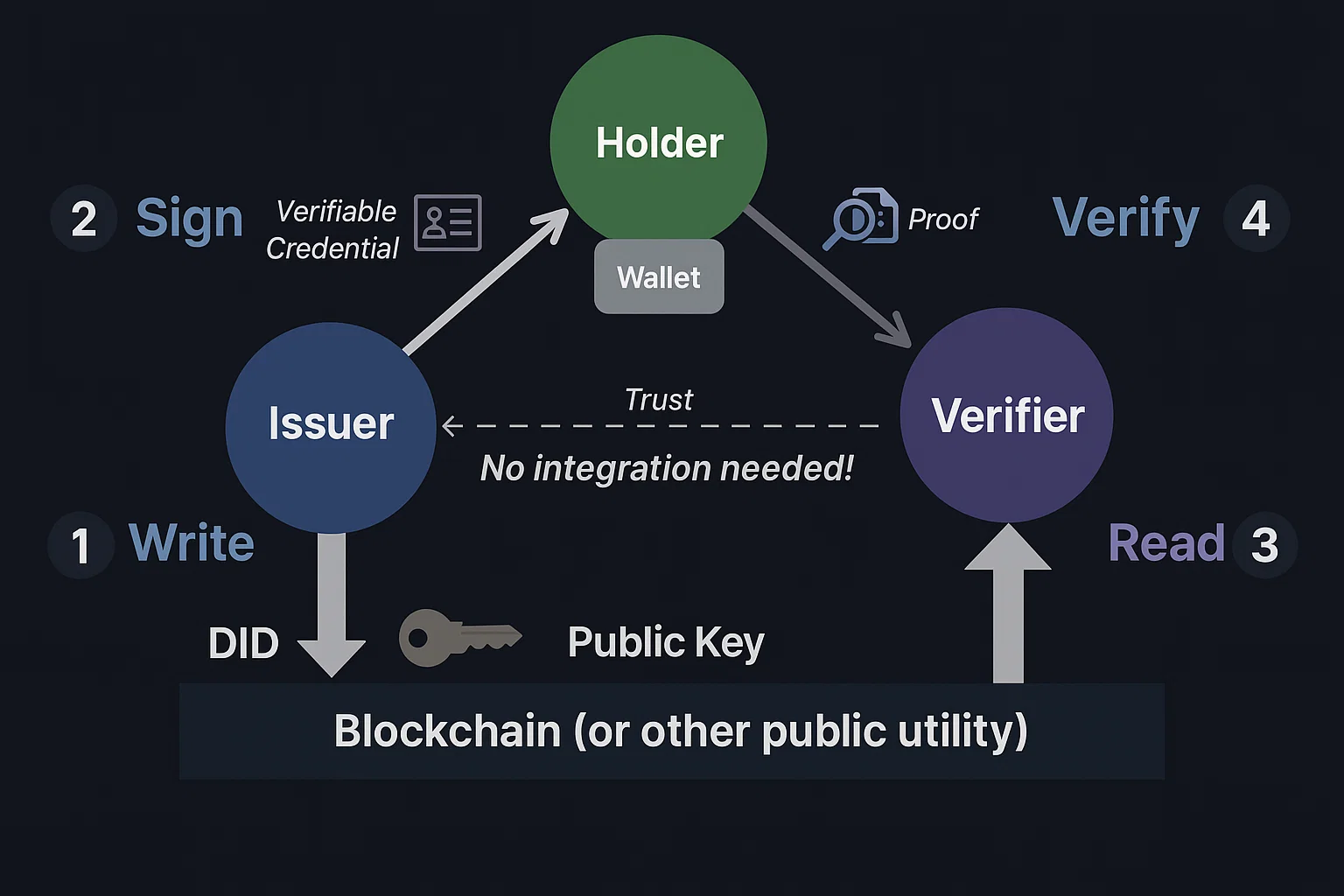
The Issuer creates a credential. The Holder stores it in their wallet. The Verifier confirms it — all anchored by a Trust Registry.
The Demo Ecosystem
Five services that form a complete trust ecosystem
This playground connects to five live services. The Organization is the trust anchor — it registers with the Verana Ecosystem, creates a Trust Registry and credential schema. The four child services inherit trust from it: two Issuers that create credentials and two Verifiers that validate them.
Registers with the Ecosystem, creates a Trust Registry and credential schema
Issues credentials to users via a conversational DIDComm chatbot
Issues credentials to users via a web form and QR code
Requests and verifies credential presentations via DIDComm chatbot
Requests and verifies credential presentations via web page and QR code
Getting Started
Install Hologram Messaging to participate in the demos

Hologram Messaging
A mobile wallet that stores your credentials and communicates with services using DIDComm — an encrypted, peer-to-peer messaging protocol. No central server ever sees your data.
Demo 1: Chatbot Flow
Obtain a credential from the Issuer Chatbot, then present it to the Verifier Chatbot
In this demo you'll use DIDComm messaging — a secure, encrypted chat channel between your wallet and the service. Scan a QR code to connect, then follow the chatbot conversation to receive and present a credential.
Step A — Get a Credential
Connect to the Issuer Chatbot to receive a verifiable credential.
- 1Tap "Generate QR Code" below
- 2Open Hologram Messaging and scan the QR code
- 3Follow the chatbot — it will ask for your details
- 4Your credential is stored in your wallet
Step B — Present Your Credential
Connect to the Verifier Chatbot and prove your identity.
- 1Tap "Generate QR Code" below
- 2Scan the QR code with Hologram Messaging
- 3The verifier requests a proof — approve it in your wallet
- 4The verifier confirms your credential without contacting the issuer
What happened? You created an encrypted DIDComm connection with each service. The issuer chatbot asked for your details and issued a signed credential. The verifier chatbot requested a proof — your wallet asked for your consent before sharing any data.
Demo 2: Web Flow
Issue and verify credentials through web interfaces
This demo uses Out-of-Band (OOB) invitations — the web page generates a one-time QR code. Scanning it starts a DIDComm exchange behind the scenes. For the verifier, once you approve the proof request, the presented attributes appear live on this page.
Step A — Issue via Web
Fill in the form on the Issuer Web, then scan the QR code to receive a credential.
- 1Tap "Open Issuer Web" below
- 2Fill in the credential form and submit
- 3Scan the generated QR code with Hologram Messaging
- 4Accept the credential offer in your wallet
Step B — Verify via Web
Present your credential and see the verified attributes appear live.
- 1Tap "Generate QR Code" below
- 2Scan the QR code with Hologram Messaging
- 3Approve the proof request in your wallet
- 4Verified attributes appear here automatically
What happened? The web verifier created a presentation request and encoded it as a QR code. Your wallet decrypted the request, asked for your consent, then sent a cryptographic proof. The verifier confirmed the credential's authenticity without ever contacting the issuer.
What Just Happened?
A summary of what you experienced
Trust Established
You connected to services registered in a Trust Registry — their authority to issue or verify was publicly verifiable.
Credential Received
You received a Verifiable Credential — a digitally signed claim stored only on your device. No central database holds it.
Proof Presented
You presented your credential to a verifier who confirmed its authenticity without calling the issuer.
Encrypted & Peer-to-Peer
All communication happened over DIDComm — encrypted, peer-to-peer, no intermediaries.